
Avian Physics 0.6 has been released! 🪶
Avian is an ECS-based 2D and 3D physics engine for Bevy, a refreshingly simple data-driven game engine built in Rust. Avian prioritizes ergonomics and modularity, with a focus on providing a native ECS-driven user experience.
Check out the GitHub repository and the introductory post for more details.
Highlights
Avian 0.6 brings several major optimizations and features:
- Move-and-slide: Avian now supports move-and-slide, the fundamental movement and collision algorithm used by Kinematic Character Controllers (KCC).
- Joint motors: Revolute joints and prismatic joints now support motors with both velocity and position control.
- BVH broad phase: Broad phase collision detection now uses OBVHS, massively improving performance for large scenes and static geometry.
- Spatial query optimizations: Spatial queries now reuse the BVH used by the broad phase, significantly reducing overhead.
The migration guide and a more complete changelog can be found on GitHub.
Move-and-Slide
For years(!) now, a very common pain point for users of Avian has been the lack of a Kinematic Character Controller (KCC).
There have been some dynamic character controllers (bevy_tnua), and numerous scattered KCC experiments from different people,
but no concentrated effort on a built-in solution.
Avian 0.6 takes the first steps towards official character controller support by implementing move-and-slide or collide-and-slide, the movement and collision algorithm at the heart of most KCCs. In short, move-and-slide attempts to move a shape along a desired velocity vector, sliding along any obstacles that are encountered along the way.
You can see it in action here for a simple 3D test scene:
The kinematic_character_2d and kinematic_character_3d examples have also been updated to use move-and-slide:
In addition to the core move-and-slide algorithm, Avian 0.6 provides other related utilities:
- Shape casts tailored for character movement using
MoveAndslide::cast_move - Depenetration for recovering from initial overlap using
MoveAndSlide::depenetrate - Novel GJK-like algorithm for projecting velocity against an arbitrary number of planes using
project_velocity - Support for overriding how velocity is applied using
CustomPositionIntegration
We will first cover some general usage examples, and then dive into the implementation details. After that, we will showcase some community work building upon the new move-and-slide functionality, and finally discuss future KCC-related work planned for Avian.
Usage
Let’s implement a simple kinematic character controller using move-and-slide. We want the following:
- The character should move according to its
LinearVelocity - The character should slide along obstacles when colliding
- The character should depenetrate if it starts overlapping with geometry
- The character should record any entities it touched during movement in a custom
TouchedEntitiescomponent
At a high level, we end up needing a system like this:
#[derive(Component, Default, Deref, DerefMut)]
struct TouchedEntities(HashSet<Entity>);

fn run_move_and_slide(
    mut query: Query<
        (
            Entity,
            &mut Transform,
            &mut LinearVelocity,
            &mut TouchedEntities,
            &Collider,
        ),
        With<Character>,
    >,
    move_and_slide: MoveAndSlide,
    time: Res<Time>,
) {
    for (entity, mut transform, mut lin_vel, mut touched, collider) in &mut query {
        // 1. Clear touched entities from last frame
        touched.clear();

        // 2. Perform move and slide, recording touched entities
        todo!();

        // 3. Update transform and velocity
        todo!();
    }
}
The move-and-slide algorithm and related utilities are provided through the MoveAndSlide system parameter.
The move_and_slide method takes a collider shape, a starting position, a desired velocity, a delta time,
configuration options, and a callback that is invoked for each collision surface encountered during movement:
// 2. Perform move and slide, recording touched entities
let MoveAndSlideOutput {
    position,
    projected_velocity,
} = move_and_slide.move_and_slide(
    collider,
    transform.translation,
    transform.rotation,
    lin_vel.0,
    time.delta(),
    &MoveAndSlideConfig::default(),
    // Ignore the character itself during collision checks
    &SpatialQueryFilter::from_excluded_entities([entity]),
    |hit| {
        // Record the touched entity
        touched.insert(hit.entity);
        // Always accept the collision
        MoveAndSlideHitResponse::Accept
    },
);The output contains the new position and the projected velocity after sliding along obstacles. We can use these to update the character’s transform and velocity:
// 3. Update transform and velocity
transform.translation = position;
lin_vel.0 = projected_velocity;
If you want to keep the original velocity, you can skip updating it altogether.
However, there’s one more problem. If the entity is a RigidBody::Kinematic, Avian will automatically
move it according to its LinearVelocity. But in this case, we want to control the position using
move-and-slide! To do this, we can add the CustomPositionIntegration component to the entity:
commands.spawn((
    Character,
    RigidBody::Kinematic,
    Collider::capsule(0.5, 1.0),
    TouchedEntities::default(),
    // Override default movement based on `LinearVelocity`
    CustomPositionIntegration,
));
This essentially tells Avian “please don’t apply the LinearVelocity automatically, I will handle it myself”.
And that’s it! We now have a very simple kinematic character controller that moves according to its LinearVelocity
and slides along obstacles.
Implementation
Next, we will go over some of the implementation details of move-and-slide in Avian. Feel free to skip ahead if you’re not interested in the nitty-gritty details!
On the surface, move-and-slide is a very simple algorithm. It essentially works like this:
- Sweep the shape along the desired velocity vector.
- If no collision is detected, move the full distance.
- If a collision is detected:
- Move up to the point of collision.
- Project the remaining velocity onto the contact surfaces to obtain a new sliding velocity.
- Repeat with the new sliding velocity until movement is complete.
Simple, right? Well, kind of. It is easy to implement the core algorithm, but making it robust
is notoriously difficult. A basic iterative approach will easily jitter when pushing against
multiple surfaces at once, or get stuck on corners or inclines. An example of this can be seen
with the built-in KCC in bevy_rapier3d (v0.33.0) jittering and getting stuck even in trivial scenarios:
This is not just Rapier either! I have seen similar issues in many other implementations and our own early prototypes. For a built-in solution in Avian however, I was insistent on something that is as robust as possible out of the box.
The algorithm that we eventually landed on looks like this:
- Initial depenetration pass to recover from any initial overlap.
- Iterative move-and-slide loop:
- Sweep the shape along the desired velocity vector.
- If we hit something, move up to the hit point.
- Collect all contact planes at the new position.
- Project velocity against all contact planes to obtain a new sliding velocity.
- Repeat until movement is complete or maximum iterations reached.
- Final depenetration pass to ensure we are not overlapping (might not be necessary).
The key parts that make this robust are:
- Avoid overlap using depenetration.
- Collect all relevant contact planes instead of just the one hit by the sweep.
- Project velocity against all contact planes simultaneously.
Let’s briefly go over each of these. The last one is the most interesting!
Depenetration
Depenetration is a simple technique where we try to push the shape out of any overlapping geometry. If we have overlap at the start of movement, the sliding algorithm might not work properly in some cases.
We opted for a simple iterative approach that looks like this:
// Modified a bit for demonstration purposes, but the core algorithm is the same
pub fn depenetrate_intersections(
    &self,
    config: &DepenetrationConfig,
    // Normals and distances of all intersecting planes
    intersections: &[(Dir3, f32)],
) -> Vector {
    let mut fixup = Vector::ZERO;

    // Gauss-Seidel style iterative depenetration
    for _ in 0..config.depenetration_iterations {
        let mut total_error = 0.0;

        for (normal, distance) in intersections {
            let error = (distance - fixup.dot(normal)).max(0.0);
            total_error += error;
            fixup += error * normal;
        }

        if total_error < config.max_depenetration_error {
            break;
        }
    }

    fixup
}
The algorithm does multiple iterations of pushing the shape out of all intersecting planes, gradually converging towards a non-overlapping position within a specified error tolerance. That’s all there is to it!
Collecting Contact Planes
When we sweep the shape along the desired velocity vector, we only obtain information about the first collision that is encountered. However, there may be multiple obstacles in close proximity, and we need to consider all of them to compute a proper sliding velocity.
To do this, after moving up to the hit point, we perform a spatial query to collect all colliders whose AABBs overlap with the character’s AABB. For each collider, we compute contact manifolds to get the normal and point of contact for each surface. A callback is invoked for each contact to allow the caller to process them as needed or halt early.
// Modified a bit for demonstration purposes, but the core algorithm is the same
pub fn intersections(
    &self,
    shape: &Collider,
    shape_position: Vec3,
    shape_rotation: Quat,
    prediction_distance: f32,
    filter: &SpatialQueryFilter,
    mut callback: impl FnMut(&ContactPoint, Dir3) -> bool,
) {
    let expanded_aabb = shape
        .aabb(shape_position, shape_rotation)
        .grow(Vec3::splat(prediction_distance));
    let aabb_intersections = self
        .query_pipeline
        .aabb_intersections_with_aabb(expanded_aabb);

    'outer: for intersection_entity in aabb_intersections {
        let Ok((intersection_collider, intersection_pos, intersection_rot, layers)) =
            self.colliders.get(intersection_entity)
        else {
            continue;
        };

        let layers = layers.copied().unwrap_or_default();
        if !filter.test(intersection_entity, layers) {
            continue;
        }

        let mut manifolds = Vec::new();
        contact_manifolds(
            shape,
            shape_position,
            shape_rotation,
            intersection_collider,
            *intersection_pos,
            *intersection_rot,
            prediction_distance,
            &mut manifolds,
        );

        for manifold in manifolds {
            let Some(deepest) = manifold.find_deepest_contact() else {
                continue;
            };

            let normal = Dir3::new_unchecked(-manifold.normal);

            if !callback(deepest, normal) {
                // Abort further processing.
                break 'outer;
            }
        }
    }
}
This part could certainly be optimized further in the future. Notably, computing full contact manifolds
is wasteful when we only need the deepest contact point, but we saw some invalid contacts using Parry’s
contact function directly, so we opted to compute manifolds for now.
While collecting contact planes, we also perform deduplication where we merge planes whose normals are very close to each other. This is important for performance for highly dense collision geometry, and does not meaningfully affect behavior within reasonable tolerances.
Velocity Projection
Perhaps the most important part of move-and-slide is how we compute the new sliding velocity after hitting an obstacle. Getting this wrong can lead to all sorts of issues like jittering, snagging on corners, or getting stuck entirely.
A popular approach that is used by Quake III’s PM_SlideMove is to accumulate contact planes
one at a time over multiple iterations, slide along any creases, and stop dead at triple plane
intersections. We did this in our original prototype too, and it worked pretty well!
Still, it felt like we could do better. Quake III’s approach involved a lot of tolerances, special cases, and velocity nudging to avoid numerical issues and getting stuck. It also didn’t feel right to me that the first iteration only considers one plane, the second iteration two planes, and so on.
Ideally, we should consider all contact planes at once from the very beginning. This would be more accurate, and converge with just one or two iterations, even when pushing against multiple surfaces. This is unfortunately not trivial to do against an arbitrary number of planes.
Luckily, we have a powerful tool at our disposal: mathematicians! With the help of @IQuick143 and @unpairedbracket, I implemented the following brute-force algorithm for projecting a velocity vector against an arbitrary number of planes simultaneously:
pub fn project_velocity_bruteforce(v: Vec3, normals: &[Dir3]) -> Vec3 {
    if normals.is_empty() {
        return v;
    }

    // The halfspaces defined by the contact normals form a polyhedral cone.
    // We want to find the closest point to v that lies inside this cone.
    //
    // There are three cases to consider:
    // 1. v is already inside the cone -> return v
    // 2. v is outside the cone
    //    a. Project v onto each plane and check if the projection is inside the cone
    //    b. Project v onto each edge (intersection of two planes) and check if the projection is inside the cone
    // 3. If no valid projection is found, return the apex of the cone (the origin)

    // Case 1: Check if v is inside the cone
    if normals.iter().all(|normal| normal.dot(v) >= -DOT_EPSILON) {
        return v;
    }

    // Best candidate so far
    let mut best_projection = Vec3::ZERO;
    let mut best_distance_sq = Scalar::INFINITY;

    // Helper to test halfspace validity
    let is_valid = |projection: Vec3| {
        normals
            .iter()
            .all(|n| projection.dot(n.adjust_precision()) >= -DOT_EPSILON)
    };

    // Case 2a: Face projections (single-plane active set)
    for n in normals {
        let n_dot_v = n.dot(v);
        if n_dot_v < -DOT_EPSILON {
            // Project v onto the plane defined by n:
            // projection = v - (v · n) n
            let projection = v - n_dot_v * n;

            // Check if better than previous best and valid
            let distance_sq = v.distance_squared(projection);
            if distance_sq < best_distance_sq && is_valid(projection) {
                best_distance_sq = distance_sq;
                best_projection = projection;
            }
        }
    }

    // Case 2b: Edge projections (two-plane active set)
    let n = normals.len();
    for i in 0..n {
        let ni = normals[i];
        for &nj in normals.iter().take(n).skip(i + 1) {
            // Compute edge direction e = ni x nj
            let e = ni.cross(nj);
            let e_length_sq = e.length_squared();
            if e_length_sq < DOT_EPSILON {
                // Nearly parallel edge
                continue;
            }

            // Project v onto the line spanned by e:
            // projection = ((v · e) / |e|²) e
            let projection = e * (v.dot(e) / e_length_sq);

            // Check if better than previous best and valid
            let distance_sq = v.distance_squared(projection);
            if distance_sq < best_distance_sq && is_valid(projection) {
                best_distance_sq = distance_sq;
                best_projection = projection;
            }
        }
    }

    // Case 3: If no candidate is found, the projection is at the apex (the origin)
    if best_distance_sq.is_infinite() {
        Vec3::ZERO
    } else {
        best_projection
    }
}
We found that this simple brute-force algorithm works really well. It is quite fast, and always finds the optimal projection, even detecting cases where we should stop dead with zero velocity. However, it is O(n^3) in the number of collision planes. This is generally fine in practice, because n should be small for the vast majority of cases, but it does leave room for improvement.
To my excitement, @unpairedbracket spent some time with this problem, and came up with a new GJK-like algorithm that solves the underlying quadratic programming problem in n steps, where each step is O(n). While the performance difference in practice is small, the algorithm is extremely cool and (to my knowledge) novel. Consider cheacking out the author’s blog post titled Velocity Projection! The source code for the algorithm can be found here.
Showcase: bevy_ahoy
Most of the upstream move-and-slide functionality was implemented by @janhohenheim.
In tandem with the upstream work, Jan has also been working on a more fully featured Source-inspired
Kinematic Character Controller called bevy_ahoy, with help from @atlv24 and others.
bevy_ahoy uses Avian’s move-and-slide under the hood, and is a great demonstration of
what you can build with it. It features:
- Walking/Running
- Jumping
- Crouching
- Stair stepping
- Slope handling
- Ground snapping
- Quake/Source movement tech (air strafe, surf, bunny hop, etc.)
- Push objects
- Be pushed by kinematic bodies
- First person camera controller
- Coyote Time
- Input Buffering
- Moving platforms
- Tic Tacs
- Mantling
- Water
- Surface friction
and more! You can see it in action here:
If you’re interested in a solid 3D KCC for Avian, consider trying out this one! Alternatively, you can vendor it to use as a base for your own character controller.
A Community Effort
The character controller work for Avian 0.6 was truly a community effort. In contrast to most of the other big features in Avian, I was quite hands-off with this one, aside from high-level guidance, review, and finishing touches. It was wonderful to see such a high level of collaboration here!
Here’s a non-exhaustive overview of the history of the KCC work:
- May 2025: @Ploruto, @atornity, @UndefinedBHVR, @LukK-Dev, @BrianWiz, and others form the Avian Character Controller Working Group (now Avian Dev) Discord server and create a kcc_prototyping repository to collaborate on prototyping KCC features and different algorithms for move-and-slide.
- August 2025: @UndefinedBHVR implements a new and improved plane solver inspired by Quake III. Unfortunately, this was lost due to a broken hard drive, but the ideas were useful for the later implementation.
- November 2025: @janhohenheim starts working on a Quake-style KCC and a move-and-slide implementation
that could be upstreamed to Avian. Lots of discussion and iteration ensues.
- @janhohenheim opens a PR (#894) for move-and-slide and related utilities.
- With the help of @IQuick143 and @unpairedbracket, I implement a plane solver that projects velocity against all planes simultaneously, replacing the Quake-style solver (see previous section).
- @unpairedbracket implements a novel and more efficient GJK-like algorithm that replaces the brute-force plane solver (#905).
- @janhohenheim keeps working on
bevy_ahoywith help from @atlv24 and others, building on top of Avian’s new move-and-slide functionality.
There were a lot of people involved in the discussions and prototyping stages. The above is just a brief overview of some of the big milestones and contributions. Thank you to everyone who was involved!
Still, this is just the start for KCC-related work in Avian. Now that we have the core move-and-slide algorithm and related utilities in place, we still need actual component-driven APIs for the commonly needed KCC features!
Future Character Controller Work
Some planned features for built-in character controller support in Avian include:
CharacterBodyorVirtualCharactercomponent for creating a KCC with move-and-slide- Ground detection
- Slope handling
- Stair stepping
- Ground snapping
- Moving platform support
- Applying forces to dynamic bodies when pushing them
The focus will be on the most fundamental features that are non-trivial to implement but can be shared across many different character controller implementations. Using these features, we can then add examples of more opinionated character controllers for different genres, including platformers, first-person shooters, top-down games, and more.
Joint Motors
A longstanding missing feature in Avian has been joint motors. They can be used to drive joints towards a target position or velocity, and are essential for character ragdolls, vehicles, and machinery, or anything else that requires joints to be motorized.
Avian 0.6 adds initial support for joint motors for revolute joints and prismatic joints. You can see them in action here:
Motors support both velocity control and position control. An example of a velocity-controlled revolute motor might look like this:
// A revolute joint with a motor that tries to rotate at 1 revolution per second,
// with a maximum torque of 100 Newton-meters.
commands.spawn(
    RevoluteJoint::new(velocity_anchor, velocity_wheel)
        .with_hinge_axis(Vec3::Z)
        .with_motor(
            AngularMotor::new(MotorModel::default())
                .with_max_torque(100.0)
                .with_target_velocity(2.0 * PI),
        ),
);
The target velocity and position of motors can be changed on the fly by mutating the joint component:
fn set_motor_velocity(mut joints: Query<&mut RevoluteJoint>) {
    for mut joint in &mut joints {
        if let Some(motor) = joint.motor.as_mut() {
            motor.target_velocity = 1.0;
        }
    }
}
Three motor models are available:
ForceBased: The motor force/torque is computed from a stiffness and damping. Requires tuning based on masses.AccelerationBased: The motor force/torque is computed from the acceleration required to reach the target, with stiffness and damping parameters. Behaves consistently across different mass configurations.SpringDamper: The motor force/torque is computed from a spring-damper system with a specified frequency and damping ratio. Unconditionally stable, and behaves consistently across different mass configurations.
Motors for spherical joints are not supported yet, but will likely be added in a future release.
BVH Broad Phase
Broad phase collision detection used crude AABB-AABB intersection tests to find potential collision pairs between colliders. These pairs are then processed in further detail by narrow phase collision detection.
In past releases, we used an extremely simple Sweep and Prune (SAP) algorithm. It had been mostly the same since the very first release, and frankly, scaled terribly with a large number of colliders.
Why was the SAP broad phase so slow?
The SAP broad phase used a very simple one-axis sweep along the x-axis. Oftentimes the y or z axis could be a better choice depending on how colliders are distributed in the scene. More sophisticated SAP implementations will either dynamically choose the best axis to sweep along, or perform multiple sweeps along different axes.
Additionally, the SAP broad phase had no optimizations for static or sleeping bodies. Each frame, it would iterate through all colliders in the outer loop, even if they hadn’t moved. Static or sleeping bodies essentially had the same overhead as dynamic bodies.
Avian 0.6 overhauls the broad phase to use Bounding Volume Hierarchies (BVH) provided by the OBVHS crate. This massively reduces overhead for scenes with a large number of colliders.
Below, you can see the new bvh stress test, visualizing the BVH structure for colliders
spawned in a grid and moving randomly. The relevant performance metrics to look at are
Broad Phase, Update AABBs, and Optimize Trees.
Especially for static scenes, the difference is huge. Below is a comparison of performance for a scene with 40,000 static colliders:
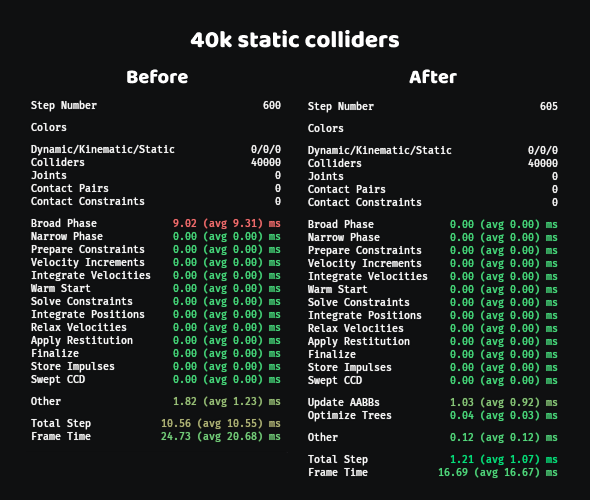
That’s a 10x improvement. In theory the step time should be even closer to zero, since this is a fully static scene, but the remaining overhead is primarily due to inefficient change detection for AABB updates. With improvements to Bevy’s change detection system, we should be able to get this down even further.
Huge thanks to @DGriffin91 for implementing incremental leaf insertion and removal, partial rebuilds, and more for OBVHS to better suit our needs <3
Implementation
Avian 0.6 uses the OBVHS crate for its Bvh2 type.
This is wrapped by a ColliderTree type that also contains “collider proxies”, which
store lightweight information needed for broad phase collision detection (entity IDs, layers, flags),
indexed by the primitive index in the BVH.
pub struct ColliderTree {
    pub bvh: Bvh2,
    pub proxies: StableVec<ColliderTreeProxy>,
    // Used during tree optimization to determine which proxies
    // need to be reinserted or which subtrees need to be rebuilt
    pub moved_proxies: Vec<ProxyId>,
    // A workspace for reusing allocations across tree operations
    pub workspace: ColliderTreeWorkspace,
}

pub struct ColliderTreeProxy {
    pub collider: Entity,
    pub body: Option<Entity>,
    pub layers: CollisionLayers,
    pub flags: ColliderTreeProxyFlags,
}
There are currently four separate ColliderTrees: dynamic, kinematic, static,
and standalone (=not attached to a rigid body).
#[derive(Resource)]
pub struct ColliderTrees {
    pub dynamic_tree: ColliderTree,
    pub kinematic_tree: ColliderTree,
    pub static_tree: ColliderTree,
    pub standalone_tree: ColliderTree,
}
Colliders are incrementally inserted or removed from trees as they are added, removed, or change type. At each time step, collider AABBs are updated, and if the tight-fitting AABB moved past the enlarged AABB stored in the tree, the proxy is marked as “moved”, its node’s AABB is updated, and the tree is refitted if necessary.
Over time, the tree can become unbalanced and inefficient to traverse. Therefore, it is necessary to optimize it periodically. Currently, Avian performs tree optimization at every time step, in an async task that runs in parallel with the narrow phase and physics solver. This hides most of the cost, and keeps the tree deterministic and frame rates more stable.
Four TreeOptimizationMode variants are supported:
Reinsert: Moved proxies are reinserted into a more optimal position in the tree. Cheap and effective for a small number of moved proxies.PartialRebuild: Parts of the tree that contain moved proxies are rebuilt. Effective for a moderate number of moved proxies.FullRebuild: The entire tree is rebuilt from scratch. Effective for highly dynamic scenes with many moved proxies.Adaptive: The optimization mode is chosen adaptively based on how many proxies moved. This is the default.
Notice how this scales based on how dynamic the scene is.
For a mostly static scene, the optimization is essentially free,
as it only needs to reinsert a few proxies here and there, if any.
Even for a highly dynamic scene however, full rebuilds are quite cheap
thanks to the incredible efficiency of OBVHS (see tray_racing),
especially since they are performed in parallel with other more expensive work.
The actual broad phase then simply traverses the trees in a parallel loop over moved proxies, and finds any potential new contact pairs.
Spatial Queries
Spatial queries (ray casts, shape casts, overlap tests) now reuse the same BVH trees used by the broad phase. This significantly reduces overhead for scenes with a large number of colliders.
In the future, we will most likely also make spatial queries generic over the collider type.
Right now, they only support the built-in Collider.
Other Changes and Fixes
There are still many other changes and fixes that I didn’t cover in detail in this post. Some notable ones include:
- Split
RigidBodyForcestrait intoReadRigidBodyForcesandWriteRigidBodyForcesto allow immutable use ofForcesby @Exotik850 in #908 - Add system that asserts that physics components are finite by @kristoff3r in #909
- Fix warning when despawning sleeping bodies by @Jondolf in #924
- Document possible ghost collisions on trimesh construction APIs by @faervan in #931
- Update to Parry 0.26 and remove dependency on Nalgebra by @Jondolf in #937
A more complete list of changes can be found on GitHub.
What’s Next?
As is tradition, let’s take a look at some of the things I am hoping to work on next for Avian. Keep in mind that this is more of a wishlist than anything; priorities and timelines can shift, so take the list with a grain of salt :)
Generic Numerics and SIMD
In the Avian 0.4 announcement, I described plans to optimize the contact solver using
wide SIMD. A major part of this was my work on glam_wide, which provides
wide SIMD versions of the math types in glam.
However, I have since realized some problems with the approach I took with glam_wide:
- It uses concrete types like
Vec3x4, making it difficult to write code that is generic over the SIMD width (ex: SSE2 vs. AVX). We could use type aliases to choose the optimal SIMD target at compile time, but this requires separate binaries for different targets. - For the contact solver, it would be good to share as much code as possible between the scalar and wide versions.
This is not possible with the concrete types in
glamandglam_wide, and would require a lot of code duplication or ugly macros.
One possible solution to both of these problems would be to define traits for all relevant math types,
like vectors, matrices, quaternions, and floats. These traits would then be implemented by both the scalar types
in glam and the wide types in glam_wide. However, this would quickly become a generic nightmare,
especially if you want good API coverage.
Ultimately, I decided to explore yet another option: a version of glam that uses generic element types.
The generic version of Vec3 is just something like this:
pub struct GVec3<T: Copy> {
    pub x: T,
    pub y: T,
    pub z: T,
}
The methods relevant to each element type are then implemented for different trait bounds.
For example, dot is implemented for every GVec3<T> where T: Num, and length
(which requires a square root) is implemented for every GVec3<T> where T: Real:
impl<T: Num> GVec3<T> {
    pub fn dot(self, rhs: Self) -> T {
        (self.x * rhs.x) + (self.y * rhs.y) + (self.z * rhs.z)
    }

    pub fn length_squared(self) -> T {
        self.dot(self)
    }
}

impl<T: Real> GVec3<T> {
    pub fn length(self) -> T {
        self.length_squared().sqrt()
    }
}
This lets us support all relevant element types in glam (floats, integers, booleans)
under one generic GVec3<T> interface, allowing us to write generic math code like this:
/// Computes tangent and bitangent directions from a normal and two velocity vectors.
/// This can be used when computing friction forces in the contact solver, for example.
fn compute_tangent_directions<T: Float>(
    normal: GVec3<T>,
    velocity1: GVec3<T>,
    velocity2: GVec3<T>,
) -> [GVec3<T>; 2] {
    let force_dir = -normal;
    let relative_velocity = velocity1 - velocity2;
    let tangent_velocity = relative_velocity - force_dir * force_dir.dot(relative_velocity);

    let tangent = tangent_velocity.normalize_or(force_dir.any_orthonormal_vector());
    let bitangent = force_dir.cross(tangent);

    [tangent, bitangent]
}
Now, you might be wondering where the Num, Real, and Float traits come from.
I initially looked into num-traits for this, but it notably does not work with wide SIMD,
as its traits use scalar values like u32 and bool. The alternative is simba, which
extends num-traits with types and traits that generalize over both scalar and wide SIMD,
but I found the API in both num-traits and simba to be a bit incomplete and inconsistent
with modern Rust conventions (ex: constants are methods instead of associated constants),
and the trait bounds were somewhat cumbersome to work with.
As a result, I ended up making my own crate for generic numerics in Rust.
It generalizes over both scalar types and wide SIMD with a single set of traits,
meaning that if you write T: Real, the same code will work whether T is a f32, f64,
f32x4, or f64x8. The API is nearly a one-to-one match with Rust’s built-in numeric types,
so you can do almost everything you can do with concrete number types, with code that looks very similar.
The notable caveat is that by default, any branching or boolean logic will need to be written
in a way that works for wide SIMD, using masks and select instead of if statements.
For example, a generic ray-sphere intersection test might look like this:
fn ray_sphere<T: Real>(
    ray_origin: GVec3<T>,
    ray_dir: GVec3<T>,
    sphere_origin: GVec3<T>,
    sphere_radius_squared: T,
) -> T {
    let oc = ray_origin - sphere_origin;
    let b = oc.dot(ray_dir);
    let c = oc.length_squared() - sphere_radius_squared;
    let discriminant = b * b - c;

    let is_discriminant_positive = discriminant.num_gt(T::ZERO);
    let discriminant_sqrt = discriminant.sqrt();

    let t1 = -b - discriminant_sqrt;
    let is_t1_valid = t1.num_gt(T::ZERO) & is_discriminant_positive;

    let t2 = -b + discriminant_sqrt;
    let is_t2_valid = t2.num_gt(T::ZERO) & is_discriminant_positive;

    let t = is_t2_valid.select(t2, T::MAX);
    is_t1_valid.select(t1, t)
}
The above method is fully generic over all real number types, including wide SIMD.
If you only need scalar types however, this kind of vectorized branching can be unwieldy or even
less efficient than simple if statements. For these cases, you can constrain T to ScalarReal
instead of Real:
// A scalar-only version of the ray-sphere intersection test
fn ray_sphere_scalar<T: ScalarReal>(
    ray_origin: GVec3<T>,
    ray_dir: GVec3<T>,
    sphere_origin: GVec3<T>,
    sphere_radius_squared: T,
) -> T {
    let oc = ray_origin - sphere_origin;
    let b = oc.dot(ray_dir);
    let c = oc.length_squared() - sphere_radius_squared;
    let discriminant = b * b - c;

    if discriminant > T::ZERO {
        let discriminant_sqrt = discriminant.sqrt();

        let t1 = -b - discriminant_sqrt;
        if t1 > T::ZERO {
            t1
        } else {
            let t2 = -b + discriminant_sqrt;
            if t2 > T::ZERO { t2 } else { T::MAX }
        }
    } else {
        T::MAX
    }
}
Both my generic numerics crate and generic glam crate will hopefully be made public in the near future,
and they will likely get their own dedicated blog post. The major remaining work I have is supporting
a SIMD backend that works on stable Rust with wide, but I should have that working soon as well.
Peck
In the Avian 0.4 announcement, I gave a progress update on Peck, my work-in-progress collision detection library that is slated to eventually replace Parry in Avian. So here’s another update!
Since Avian 0.4, we managed to:
- Integrate @atlv24’s GJK and EPA implementations (much faster and more robust than the old Parry-inspired versions)
- Add convex radii, used to improve the robustness and efficiency of GJK and EPA
- Add more analytic ray casting and point query implementations
- Add closest surface normal queries, useful for computing face normals for shape casts
- Add pair-wise query dispatchers, shape casts, closest point queries, deepest contact queries, and more
- Add 2D convex hulls
- …a lot more!
Here’s a quick demo of shape casts for a 2D convex hull shape:
The next big steps are:
- Add 3D convex hulls
- Add triangle meshes
- Add heightfields
- Add polylines
- Add compound shapes
- Improve APIs and documentation
There’s still a lot of work to be done, but we’re slowly getting to a point where Peck is a viable replacement for Parry in Avian. Stay tuned for more updates :)
Cleanup and Polish
Avian has slowly but surely been reaching closer parity with other big physics engines in terms of features and performance. While there’s still a lot more to be done there, I think it’s time to shift gears towards refining both the internals and the public API for a moment.
Low-hanging fruit includes reorganizing modules and concerns, adding more tests and documentation,
reducing dependencies between plugins, and making minimal configurations easier. I would also
like to try depending on sub-crates like bevy_ecs instead of bevy directly, in order to
improve compile times and be more mindful of our dependencies.
Why depend on sub-crates instead of bevy with default-features = false?
This is a somewhat controversial topic in the ecosystem. On one hand, depending on
sub-crates like bevy_ecs has the following caveats:
- Unless end users also use subcrates (most don’t), they need to manually specify all
bevyfeatures required by third party crates, or otherwiseDefaultPluginsand the prelude won’t have them, despite the dependencies being in the tree. - Cargo patching breaks; you need to manually patch each and every subcrate that is depended on
separately, instead of just patching
bevy. - If a third party crate exposes a macro that uses a subcrate like
bevy_ecs, but downstream users usebevy, the macro will return an error. Note that this also applies the other way if users were using subcrates and third party crates were usingbevy.
However, (1) and (3) are not actually meaningful problems for Avian, and (2) is only a problem for advanced users. Users are also likely to run into (2) regardless of what Avian does, as a large portion of other third party crates in the ecosystem already depend on sub-crates.
The biggest benefit of depending on sub-crates is faster cold compile times.
If Avian depends on bevy, it needs to wait for all of bevy to compile first
(including rendering, UI, audio…), but if it only depends on crates like bevy_ecs,
bevy_app, and bevy_math, it can start compiling much sooner. It also lets us
be more intentional about our dependencies and features, and make sure we only
depend on what we actually need.
More complicated or controversial changes include splitting up the RigidBody enum into
separate DynamicBody, KinematicBody, and StaticBody components, reworking some semantics
around colliders and sensors, combining Position and Rotation into a PhysicsTransform component,
and more.
Keep in mind that these changes are not set in stone however, and need some more time in the oven to prove out the designs.
More Character Controller Features
Now that we have the core move-and-slide algorithm in place, we can start building more features and utilities for character controllers. As listed before, this includes features like:
CharacterBodyorVirtualCharactercomponent for creating a KCC with move-and-slide- Ground detection
- Slope handling
- Stair stepping
- Ground snapping
- Moving platform support
- Applying forces to dynamic bodies when pushing them
Alongside these features, we can also add examples of opinionated character controllers for different genres, including platformers, first-person shooters, and top-down games.
Support Me
While Avian will always be free and permissively licensed, developing and maintaining it takes a lot of time and effort.
If you find my work valuable, consider supporting me through GitHub Sponsors. This is ultimately my hobby, but by supporting me, you can help make it more sustainable.
Thank you ❤️